File Manager
File Manager PlusProductivity
4.621.34K Reviews
- Version
- Varies With Device
- Installs
- 100.00M
- Age Rating
- Everyone
Screenshots


Our Review of File Manager
 Analysis by Appyee
Ever felt like your phone is a digital jungle, and you’re lost somewhere between a sea of photos and a mountain of documents? Well, I’ve been there too. That’s when I stumbled upon the File Manager app. It promises to be the ultimate tool to organize, manage, and declutter your digital life. So, I decided to dive deep and see if it lives up to the hype.
Getting Started with File Manager
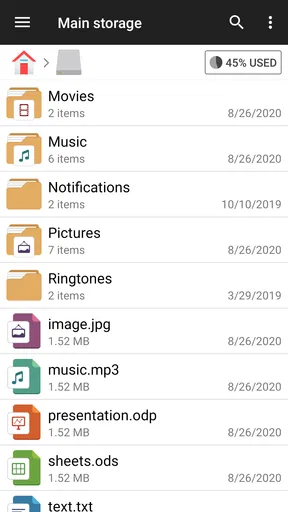
First things first, downloading the app was a breeze. A quick search on the Play Store or App Store, and you’re good to go. Once installed, the File Manager greets you with a clean, intuitive interface. It’s like the Marie Kondo of file management apps, sparking joy right from the start.
User Interface and Experience
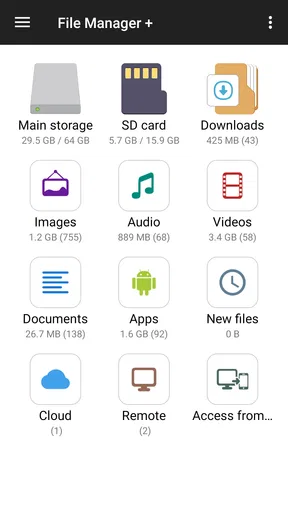
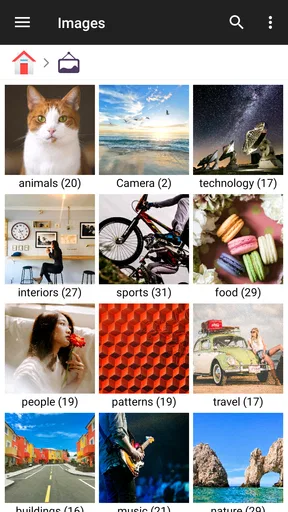
The layout is as straightforward as it gets. You’ve got your main categories like Images, Videos, Documents, Music, and Apps right on the home screen. It’s a bit like having a personal assistant who knows exactly where everything is. No more endless scrolling or desperate searches when you need that one file urgently.
Navigating the app feels smooth. The developers have clearly put a lot of thought into ensuring that even the least tech-savvy among us can find their way around. It’s all about enhancing productivity without the fuss.
Features That Stand Out
What really caught my attention was the range of features packed into this app. Here’s a quick rundown of what impressed me the most:
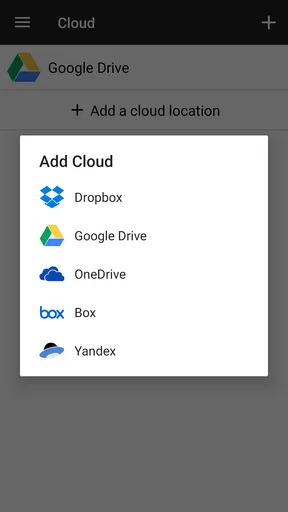
- Cloud Integration: Sync your files seamlessly with popular cloud services like Google Drive, Dropbox, and OneDrive. It’s a lifesaver for those of us who work across multiple devices.
- File Transfer: Share files effortlessly between your phone and PC using the FTP server option. No cables, no hassle.
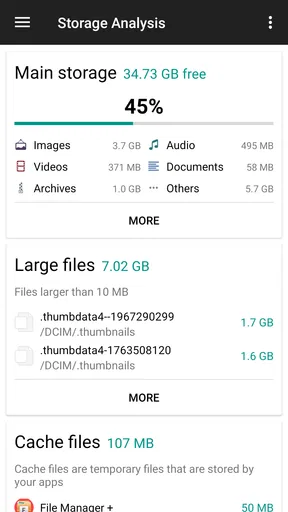
- Storage Analysis: Discover what’s hogging your storage space with detailed analytics. It’s like having an X-ray vision for your storage.
- Secure and Private: The app offers built-in encryption to keep your sensitive files safe. Peace of mind, anyone?
Performance and Reliability
Now, let’s talk about performance. The File Manager app runs smoothly without any noticeable lag. Whether you’re moving large files or just browsing through your folders, everything feels responsive. It’s like having a well-oiled machine at your fingertips.
Reliability is another plus point. No crashes or unexpected errors during my testing period, which is more than I can say for some other apps I’ve tried. It’s clear that stability is a priority for the developers.
Who Would Love This App?
If you’re someone who loves keeping things organized, this app is your best friend. It’s perfect for students managing tons of documents, professionals juggling work files, or even just everyday users who want to keep their digital space tidy.
And let’s not forget those of us who are privacy-conscious. With the app’s encryption features, you can rest easy knowing your files are safe from prying eyes.
Final Thoughts
After spending some quality time with the File Manager app, I can confidently say it’s a must-have tool for anyone looking to take control of their digital life. It’s intuitive, feature-rich, and reliable—a rare combination these days.
So, if you’re tired of feeling overwhelmed by your files and want to streamline your device’s storage, give this app a try. Who knows, it might just be the organizational guru you’ve been searching for!
Verdict
Strengths of File Manager
- Intuitive and user-friendly interface.
- Supports multiple file formats.
- Robust search functionality.
- Integrates with cloud services.
- Secure file encryption options.
Limitations of File Manager
- Ads can be intrusive at times.
- Some features require in-app purchases.
- Occasional slow loading speeds.
- Limited customization options.
- No built-in media player.
Similar Picks in This Category
View All
Google Calendar
Google LLC4.6

Google Drive
Google LLC4.3

Google Assistant
Google LLC3.9

Microsoft OneDrive
Microsoft Corporation4.6

Samsung Calendar
Samsung Electronics Co., Ltd.4.1

Microsoft OneNote: Save Notes
Microsoft Corporation4.6
Frequently Asked Questions
What features does the File Manager app offer?
The File Manager app provides a wide array of features including file browsing, organizing, and managing capabilities. It supports cloud storage integration, allowing you to sync files across different platforms such as Google Drive and Dropbox. Additionally, it offers file compression, extraction, and secure encryption to keep your data safe.
Is the File Manager app compatible with both Android and iOS?
Yes, the File Manager app is designed to be compatible with both Android and iOS devices. This cross-platform functionality ensures that users can enjoy a seamless experience regardless of their device. The app's interface is optimized for both operating systems, making navigation intuitive and user-friendly.
How secure is the File Manager app?
The File Manager app places a strong emphasis on security. It includes features such as password protection and file encryption to safeguard your sensitive information. Additionally, it regularly updates its security protocols to protect against vulnerabilities, ensuring that your data remains private and secure at all times.
Can I use the File Manager app offline?
Yes, the File Manager app allows you to manage and organize your files offline. You can access local storage without an internet connection, making it convenient for situations where connectivity is limited. However, cloud-based features will require an internet connection to sync and access online storage.
Are there any in-app purchases or advertisements in the File Manager app?
The File Manager app is available as a free download, but it does offer in-app purchases for advanced features such as premium cloud integration and additional security options. Advertisements may be present in the free version, but these can be removed by upgrading to the premium version, providing an ad-free experience.
